by Unknown | at 5:55 PM
^^! nhiều khi muốn nhập nhiều dữ liệu trên gridview dùng sự kiện enter lên ta có thể dùng javascript để bắt sự kiện này
B1: tạo javascript
<script type="text/javascript">
function clickEnter(obj, event) {
var keyCode;
if (event.keyCode > 0) {
keyCode = event.keyCode;
}
else if (event.which > 0) {
keyCode = event.which;
}
else {
keycode = event.charCode;
}
if (keyCode == 13) {
document.getElementById(obj).focus();
return false;
}
else {
return true;
}
}
B2:gọi javascipt trong các sự kiện load dữ liệu lên gridview
thêm đoạn code sau ở trong sự kiện load dữ liệu
:for (int i = 0; i < gvw_danhsach_nhapma_bk1.Rows.Count - 1; i++)
{
TextBox curTexbox = gvw_danhsach_nhapma_bk1.Rows[i].Cells[4].FindControl("txtTrongLuong") as TextBox;
TextBox nexTextbox = gvw_danhsach_nhapma_bk1.Rows[i + 1].Cells[4].FindControl("txtTrongLuong") as TextBox;
curTexbox.Attributes.Add("onkeypress", "return clickEnter('" + nexTextbox.ClientID + "', event)");
TextBox curTexbox2 = gvw_danhsach_nhapma_bk1.Rows[i].Cells[5].FindControl("txtCuoc") as TextBox;
TextBox nexTextbox2 = gvw_danhsach_nhapma_bk1.Rows[i + 1].Cells[5].FindControl("txtCuoc") as TextBox;
curTexbox2.Attributes.Add("onkeypress", "return clickEnter('" + nexTextbox2.ClientID + "', event)");
try { tongtl += Convert.ToDecimal(curTexbox.Text); }
catch { }
try { tongcuoc += Convert.ToInt32(curTexbox2.Text); }
catch { }
}
// html gridview của code mẫu lưu ý 2 dòng tạo textbox
<asp:GridView ID="gvw_danhsach_nhapma_bk1" runat="server" Width="100%"
CssClass="grid"
HeaderStyle-CssClass="header"
FooterStyle-CssClass="footer"
RowStyle-CssClass="row"
AlternatingRowStyle-CssClass="alternating" ShowFooter="True"
AutoGenerateColumns="false" DataKeyNames="ID" onrowdatabound="gvw_danhsach_nhapma_bk1_RowDataBound"
>
<AlternatingRowStyle CssClass="alternating" />
<Columns>
<asp:BoundField DataField="NgayNhap" HeaderText="Ngày" DataFormatString="{0:dd/MM/yyyy }"/>
<asp:BoundField DataField="SoLo" HeaderText="Lô" />
<asp:BoundField DataField="MBC_BC_TRA" HeaderText="BC Trả" />
<asp:BoundField DataField="MaBK1" HeaderText="Mã vạch" ItemStyle-Font-Bold="true" />
<asp:TemplateField headertext="Trọng Lượng (kg)">
<HeaderStyle HorizontalAlign="Left" />
<ItemStyle HorizontalAlign="Left"/>
<ItemTemplate><asp:TextBox id="txtTrongLuong" text='<%#Eval("TrongLuong")%>' runat="server" /></ItemTemplate>
</asp:TemplateField>
<asp:TemplateField headertext="Cước">
<HeaderStyle HorizontalAlign="Left" Width="50px" />
<ItemStyle HorizontalAlign="Left"/>
<ItemTemplate><asp:TextBox id="txtCuoc" text='<%#Eval("Cuoc")%>' runat="server"/></ItemTemplate>
</asp:TemplateField>
<asp:TemplateField headertext="In">
<HeaderStyle HorizontalAlign="Left" Width="50px" />
<ItemStyle HorizontalAlign="Left"/>
<ItemTemplate><asp:HyperLink ID="hlk_in" runat="server"
NavigateUrl='<%# Eval("ID","InGiaoDich/InVanDon.aspx?ID={0}") %>' Target="_blank" >BK1</asp:HyperLink> </ItemTemplate>
</asp:TemplateField>
<asp:BoundField DataField="TenKhachHang" HeaderText="Người nhận" />
<asp:BoundField DataField="DiaChi" HeaderText="Địa chỉ" HeaderStyle-Width="200px"/>
</Columns>
<FooterStyle CssClass="footer" />
<HeaderStyle CssClass="header" />
<RowStyle CssClass="row" />
</asp:GridView>
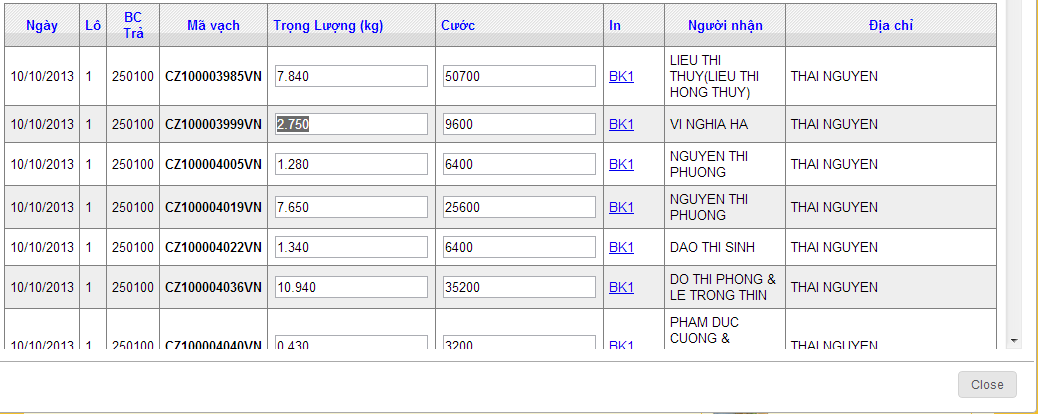
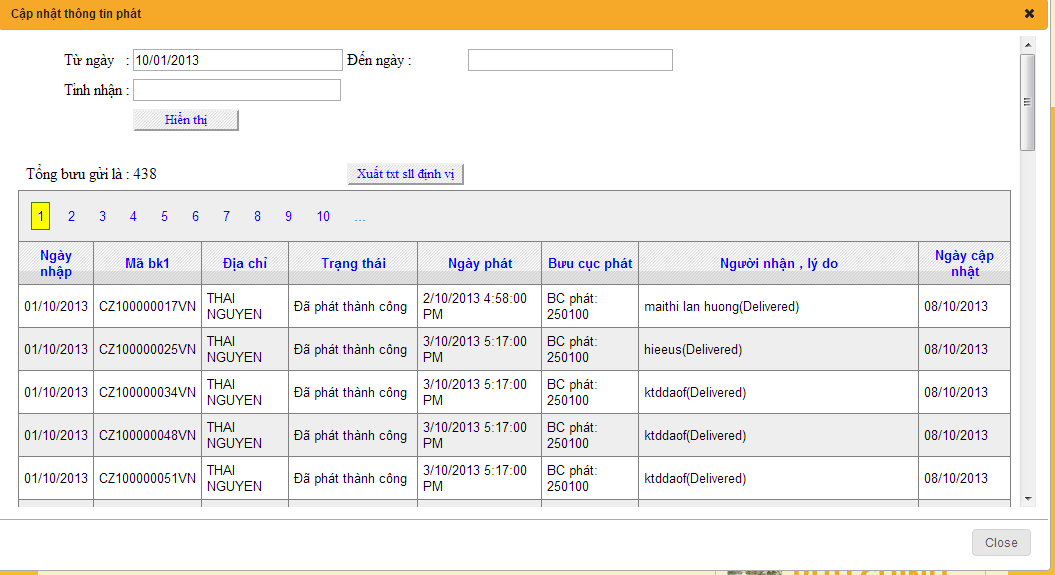
^^! sau khi hoàn thành ta xem thành quả :

by Unknown | at 5:46 PM
B1: tạo javascript để dịnh dạng key tên :dinhdangchinhapso.js
function ValidateKeypress(numcheck, e) {
var keynum, keychar, numcheck;
if (window.event) {//IE
keynum = e.keyCode;
}
else if (e.which) {// Netscape/Firefox/Opera
keynum = e.which;
}
if (keynum == 8 || keynum == 127 || keynum == null || keynum == 9 || keynum == 0 || keynum == 13) return true;
keychar = String.fromCharCode(keynum);
var result = numcheck.test(keychar);
return result;
}
B2: gọi javacript trên vào web
<script type="text/javascript" src="dinhdangchinhapso.js"></script>
thêm sự kiện onkeypress cho textbox cần dịnh dạng
<asp:TextBox ID="txt1" onkeypress="return ValidateKeypress(/\d/,event);" runat="server" />
by Unknown | at 5:40 PM
vừa nghịch xong cái này ai cần có thể tam khảo
B1: cài file patch cho excel trên server tên AccessDatabaseEngine các bạn có thể lên google seach lấy về bản cài phù hợp với server của các bạn http://codechicken.blogspot.com/
B2: viết code upload và hiển thị dữ liệu lên girdview khi cần thiết
--
Code html :
<body>
<form id="form1" runat="server">
<p>
<table style="width:100%;">
<tr>
<td class="style2">
</td>
<td class="style4">
<td>
</td>
</tr>
<tr>
<td class="style2">
Chọn file excel :</td>
<td class="style3">
<asp:FileUpload ID="FileUpload1" runat="server" />
</td>
<td>
</td>
</tr>
<tr>
<td class="style2">
</td>
<td class="style3">
<asp:Button ID="btnUpload" runat="server" Text="Tải lên"
OnClick="btnUpload_Click" CssClass="button" Width="65px" />
</td>
<td>
</td>
</tr>
<tr>
<td class="style2">
<asp:Label ID="Label1" runat="server" Visible="False"></asp:Label>
</td>
<td class="style3">
<asp:Label ID="Label2" runat="server" Visible="False"></asp:Label>
</td>
<td>
<asp:Label ID="Label3" runat="server" Visible="False"></asp:Label>
</td>
</tr>
<tr>
<td class="style1">
<asp:Label ID="lblIDKhachHang" runat="server" Visible="False"></asp:Label>
</td>
<td class="style3">
</td>
<td>
<asp:Button ID="btnghi" runat="server" Text="Ghi cập nhật" Width="172px"
onclick="btnghi_Click1" CssClass="button" />
</td>
</tr>
<tr>
<td class="style1">
Tổng đơn hàng là :</td>
<td class="style3">
<asp:Label ID="lblTongDonHang" runat="server"></asp:Label>
</td>
<td>
</td>
</tr>
</table>
</p>
<div>
<asp:GridView ID="GridView1" runat="server" Width="100%"
CssClass="grid"
HeaderStyle-CssClass="header"
FooterStyle-CssClass="footer"
RowStyle-CssClass="row"
AlternatingRowStyle-CssClass="alternating" ShowFooter="True"
onrowdatabound="GridView1_RowDataBound" AutoGenerateColumns="False"
>
<AlternatingRowStyle CssClass="alternating" />
<Columns>
<asp:BoundField DataField="STT" HeaderText="STT" />
<asp:BoundField DataField="SoDonHang" HeaderText="Số đơn hàng" />
<asp:BoundField DataField="SoHoaDon" HeaderText="Số hóa đơn" />
<asp:BoundField DataField="TrongLuong" HeaderText="Trọng lượng" />
<asp:BoundField DataField="SoKien" HeaderText="Số kiện" />
<asp:BoundField DataField="MaKhachHang" HeaderText="Mã khách hàng" />
<asp:BoundField DataField="TenKhachHang" HeaderText="Tên khách hàng" />
<asp:BoundField DataField="SoDienThoai" HeaderText="Số điện thoại" />
<asp:BoundField DataField="QuanHuyen" HeaderText="Quận huyện" />
<asp:BoundField DataField="DiaChi" HeaderText="Địa chỉ" />
</Columns>
<FooterStyle CssClass="footer" />
<HeaderStyle CssClass="header" />
<RowStyle CssClass="row" />
</asp:GridView>
</div>
</form>
</body>
</html>
////////////////////////code nut upload ở đây mình chưa kiểm tra tên và dung lượng file các bạn tự phát triển thêm
protected void btnUpload_Click(object sender, EventArgs e)
{
if (FileUpload1.HasFile)
{
string FileName = Path.GetFileName(FileUpload1.PostedFile.FileName);
Label1.Text = FileName.ToString();
string Extension = Path.GetExtension(FileUpload1.PostedFile.FileName);
Label2.Text = Extension.ToString();
string FolderPath = ConfigurationManager.AppSettings["FolderPath"];
string FilePath = Server.MapPath(FolderPath + FileName);
Label3.Text = FilePath.ToString();
FileUpload1.SaveAs(FilePath);
// GetExcelSheets(FilePath, Extension, "Yes");
Import_To_Grid(FilePath, Extension, "Yes");
}
}
///////////code hiển thị dữ liệu lên gridview khi upload thành công
private void Import_To_Grid(string FilePath, string Extension, string isHDR)
{
string conStr = "";
switch (Extension)
{
case ".xls": //Excel 97-03
conStr = ConfigurationManager.ConnectionStrings["Excel03ConString"]
.ConnectionString;
break;
case ".xlsx": //Excel 07
conStr = ConfigurationManager.ConnectionStrings["Excel07ConString"]
.ConnectionString;
break;
}
conStr = String.Format(conStr, FilePath, isHDR);
OleDbConnection connExcel = new OleDbConnection(conStr);
OleDbCommand cmdExcel = new OleDbCommand();
OleDbDataAdapter oda = new OleDbDataAdapter();
DataTable dt = new DataTable();
cmdExcel.Connection = connExcel;
//Get the name of First Sheet
connExcel.Open();
DataTable dtExcelSchema;
dtExcelSchema = connExcel.GetOleDbSchemaTable(OleDbSchemaGuid.Tables, null);
string SheetName = dtExcelSchema.Rows[0]["TABLE_NAME"].ToString();
connExcel.Close();
//Read Data from First Sheet
connExcel.Open();
cmdExcel.CommandText = "SELECT * From [" + SheetName + "]";
oda.SelectCommand = cmdExcel;
oda.Fill(dt);
connExcel.Close();
//Bind Data to GridView
GridView1.Caption = Path.GetFileName(FilePath);
GridView1.DataSource = dt;
GridView1.DataBind();
lblTongDonHang.Text = dt.Rows.Count.ToString();
}
//// lưu ý chuỗi kết nối trong web config
<?xml version="1.0"?>
<configuration>
<appSettings>
<add key="FolderPath" value="Files/"/>
<add key="FolderPathThongTinPhat" value="../FilesThongTinPhat/"/>
<add key="CrystalImageCleaner-AutoStart" value="true"/>
<add key="CrystalImageCleaner-Sleep" value="60000"/>
<add key="CrystalImageCleaner-Age" value="120000"/>
</appSettings>
<connectionStrings>
<add name="Excel03ConString" connectionString="Provider=Microsoft.Jet.OLEDB.4.0; Data Source={0};Extended Properties='Excel 8.0;HDR={1}'"/>
<add name="Excel07ConString" connectionString="Provider=Microsoft.ACE.OLEDB.12.0; Data Source={0};Extended Properties='Excel 8.0;HDR={1}'"/>
<add name="conString" connectionString="server=servername;database=A;user id=chay;password=123" providerName="System.Data.SqlClient"/>
<add name="conString3" connectionString="server=sẻvername;database=B;user id=chay;password=123" providerName="System.Data.SqlClient"/>
</connectionStrings>
hình ảnh sau khi xong code:

by Unknown | at 5:23 PM
nhìn giao diện cái gridview của C# đơn điệu quá ta có thể dùng css định dạng lại nhìn cho thân thiện hơn như sau
B1: tạo css định dạng tên : dinhdanggridview.css (lưu ý ở đây mình định dạng lun cả phân trang và button của asp.net)
.grid
{
font:normal normal normal small normal Arial, Sans-Serif;
background-image:url('../Images/filter_row_bg') ;
background-repeat: repeat;
}
.grid td, .grid th
{
padding:5px;
}
.header
{
text-align:center;
color:Blue;
background-image:url(../images/sort_row_bg.gif) ;
background-repeat: repeat;
}
.row td
{
/* border-bottom:solid 1px ;*/
}
.alternating
{
background-color:#eeeeee;
}
.alternating td
{
/* border-bottom:solid 1px ;*/
}
.footer
{
height:50px;
text-align:center;
color:Blue;
background-image:url(../images/sort_row_bg.gif) ;
background-repeat: repeat;
}
.button
{
text-align:center;
color:Blue;
background-image:url('../images/sort_row_bg.gif') ;
background-repeat: repeat;
font-size: small;
font-family: "Times New Roman", Times, serif;
}
.button:hover
{
background-image:url('../images/sort_row_bg.gif') ;
border: solid 1px grey;
font-family: Arial, sans-serif;
font-size: 12px;
font-weight: bold;
color: Red;
height: 25px;
}
.pagination
{
line-height: 26px;
}
.pagination span
{
padding: 5px;
border: solid 1px #477B0E;
text-decoration: none;
white-space: nowrap;
background: yellow;
}
.pagination a,
.pagination a:visited
{
text-decoration: none;
padding: 6px;
white-space: nowrap;
}
.pagination a:hover,
.pagination a:active
{
padding: 5px;
border: solid 1px #9ECDE7;
text-decoration: none;
white-space: nowrap;
background: white;
}
B2: vào trang cần định dạng
- thêm css : <link rel="Stylesheet" href="CSS/dinhdanggridview.css" type="text/css"/>
- gọi css trong gridview:
<asp:GridView ID="GridView1" runat="server" Width="100%"
CssClass="grid"
HeaderStyle-CssClass="header"
FooterStyle-CssClass="footer"
RowStyle-CssClass="row"
AlternatingRowStyle-CssClass="alternating" ShowFooter="True"
onrowdatabound="GridView1_RowDataBound" AutoGenerateColumns="False"
>
</asp:GridView>
sau khi thực hiện các bước như trên ta được như hình

by Unknown | at 1:36 AM
^^! rảnh rỗi code trong web củi cho người bạn cái web nhân sự ai muốn phát triển thêm để nộp bài thì down nè
mở bằng vs2010 và sql server 2008
code
http://www.mediafire.com/download/566sg5o9jhpv9vi/QLNhanSu.rar
database
http://www.mediafire.com/download/3lxej12ht6l3rwl/QLNhanSu
hay thì ấn thanks ^^!
tài khoản :admin pass 123 hoặc 123456
hình ảnh web

by Unknown | at 7:03 PM
mới kiếm được cái tài liệu hay ^^! wa hay
link down
by Unknown | at 8:19 AM
WCF – Một số khái niệm cơ bản
 WCF (Windows Communication Foundation):
- Cấu trúc của WCF service.
- Mô hình kết nối ABC.
- Các loại Contract.
Khái niệm
“Windows Communication Foundation (WCF) is Microsoft’s unified programming model for building service-oriented applications. It enables developers to build secure, reliable, transacted solutions that integrate across platforms and interoperate with existing investments.” (MSDN).
WCF (Windows Communication Foundation) là công nghệ mới nhất được thiết kế theo kiến trúc hướng dịch vụ (Service Oriented Architecture – SOA). Mục đích của WCF là tạo một công nghệ thống nhất cho các công nghệ giao tiếp trước đây như: Web Services, .NET Remoting, Microsoft Message Queuing và COM+.
Ba thành phần chính của một WCF service là:
- Service class: định nghĩa các contact (sẽ trình bày ở bên dưới).
- Hosting environment: WCF service có thể được host lên nhiều “môi trường” khác nhau, bao gồm IIS, Windows service, Selt-hosting.
- End point: Các “cổng” kết nối giữa client và service.
Mô hình kết nối ABC
Việc giao tiếp giữa client và WCF service được thực hiện thông qua các Endpoint. Như vậy một service có thể làm chấp nhận và xử lý nhiều yêu cầu khác nhau thông các endpoint riêng biệt. Mỗi endpoint được tạo thành từ ba thành phần với tên gọi tắt rất dễ nhớ là ABC. Trong đó:
- A – Address (Where): địa chỉ của service.
- B – Binding (How): Cách thức giao tiếp với service. Thành phần này xác định loại giao thức kết nối giữa client và service (như HTTP, TCP, MSMQ,…), kênh xử lý và kiểu mã hóa thông điệp. Danh sách các kiểu binding:
Name
Purpose
BasicHttpBinding
Interoperability with Web services and clients supporting the WS-BasicProfile 1.1 and Basic Security Profile 1.0.
WSHttpBinding
Interoperability with Web services and clients that support the WS-* protocols over HTTP.
WSDualHttpBinding
Duplex HTTP communication, by which the receiver of an initial message does not reply directly to the initial sender, but may transmit any number of responses over a period of time by using HTTP in conformity with WS-* protocols.
WSFederationBinding
HTTP communication, in which access to the resources of a service can be controlled based on credentials issued by an explicitly-identified credential provider.
NetTcpBinding
Secure, reliable, high-performance communication between WCF software entities across a network.
NetNamedPipeBinding
Secure, reliable, high-performance communication between WCF software entities on the same machine.
NetMsmqBinding
Communication between WCF software entities by using MSMQ.
MsmqIntegrationBinding
Communication between a WCF software entity and another software entity by using MSMQ.
NetPeerTcpBinding
Communication between WCF software entities by using Windows Peer-to-Peer Networking.
- C – Contact (What): Bản mô tả các chức năng của service. Cụ thể, đây là các class (structure, enum,…) được định nghĩa bên service để với các phương thức mà client có thể yêu cầu service thực hiện.

Contract
Contract được coi là một bản “hợp đồng” quy định cách thức và phương tiện để hai bên có thể hợp tác và làm việc với nhau. Trong WCF, các contact được coi như những bản mô tả nhiệm vụ, kiểu dữ liệu của service. Client sẽ có được các contact sau khi tham chiếu đến service và thông qua đó để gửi và nhận các thông điệp. Như vậy, service và client không sử dụng cùng các kiểu dữ liệu như nhau, mà chỉ sử dụng chung các contact.
Service Contract
Mô tả các công việc của service, bao gồm các kiểu dữ liệu truyền đi và kiểu dữ liệu trả về. Cụ thể, đây là các khai báo phương thức kèm với các tham số và kiểu trả về của service. Loại contract này có thể được chia ra làm hai phần là service contract (tương ứng với các interface) và operation contract (là các method).
Data Contract
“A data contract is a formal agreement between a service and a client that abstractly describes the data to be exchanged. That is, to communicate, the client and the service do not have to share the same types, only the same data contracts. A data contract precisely defines, for each parameter or return type, what data is serialized (turned into XML) to be exchanged.” (MSDN)
Mô tả các kiểu dữ liệu tự tạo mà client có thể sử dụng. Các contract này dùng để chứa các dữ liệu cần thiết để truyền tải giữa client và service. Nếu service chỉ sử dụng các kiểu dữ liệu đơn giản (như int, string, DateTime,…) thì service đó không cần đến Data Contract.
Message Contract
Tương tự như Data Contract nhưng kiểu contract này nhằm mục đích định nghĩa cấu trúc của các thông điệp được truyền tải dưới dạng SOAP (Simple Object Access Protocol). Một thông điệp SOAP được chia thành 2 phần là header và body.

MSDN – Mối quan hệ của các loại contract với với common language runtime (CLR)
Fault Contract
Loại contact này giúp quản lý các ngoại lệ mà service ném ra khi thực hiện các yêu cầu của client. Khi cần thiết, service sẽ ném ra một FaultException nếu như muốn client bắt được ngoại lệ này.
// nguồn của anh yinyang congdongcviet
examples mình làm về wcf
File Đính Kèm
by Unknown | at 11:22 PM
^^! xem demo bằng vs2010 và sql 2008 nha
file đính kèm
hình ảnh kèm theo
by Unknown | at 12:08 PM
Cuối tuần rảnh nghịch chơi có cái đó nhìn cũng được thì up lên chơi
mở file đính kèm bằng sql 2008 và vs2010 nha.
bắt đầu bằng các chúng ta viết javascript cho gridview cần sự kiện :
<script type="text/javascript">
var lastColor;
function DG_changeBackColor(row, highlight) {
if (highlight) {
row.style.cursor = "hand";
lastColor = row.style.backgroundColor;
row.style.backgroundColor = 'yellow';
}
else
row.style.backgroundColor = lastColor;
}
</script>
sau đó gọi đến sự kiện RowDataBound của gridview cần đổi màu :
protected void gvw_danhsach_nhapma_bk1_RowDataBound(object sender, GridViewRowEventArgs e)
{
if ((e.Row.RowType == DataControlRowType.Pager) || (e.Row.RowType == DataControlRowType.Header) || (e.Row.RowType == DataControlRowType.Footer))
{
return;
}
else
{
//Thêm sự kiện để thay đổi mày nền khi di chuyển con trỏ qua 1 dòng
e.Row.Attributes.Add("onmouseover", "DG_changeBackColor(this, true);");
e.Row.Attributes.Add("onmouseout", "DG_changeBackColor(this,false);");
// e.Row.Attributes.Add("onclick", "DG_changeBackColor(this,true);");
}
}
file đính kèm
sau khi làm xong được như hình :

by Unknown | at 3:21 AM
nay gặp phải trường hợp người dùng muốn in lại dữ liệu chọn trên datagridview lên làm cái chọn chuột phải hiện cái menustrip lên cho nó hoành tráng :))
// sự kiện load nho load cai menustrip lên
public void BC34GiaoDich_Load(object sender, EventArgs e)
{
sukieninlai();
}
// khai báo in lại
ContextMenuStrip contextMnStrip = new ContextMenuStrip();
private void sukieninlai()
{
contextMnStrip.Items.Add("In Lại");
contextMnStrip.MouseClick += new MouseEventHandler(Print_InLai);
}
//sự kiện in lại
private void Print_InLai(object serder, MouseEventArgs e)
{
//MessageBox.Show("Sự kiện in lại");
if (mact != null && mact != "")
{
ChiTietBC34 fromct = new ChiTietBC34(IDBuuCucGuiBC37, dtpNgay.Value, mact, idbuucucnhanct, sochuyenthuct, sotuict, trongluongct, tuifct, ghichuct);
fromct.Show();
}
else {
MessageBox.Show("Dữ liệu theo lô chưa lưu! Chưa thể in lại");
return;
}
}
// khai báo biến cho from in lại
string mact;
int idbuucucnhanct;
string sochuyenthuct;
int sotuict;
double trongluongct;
string tuifct;
int ghichuct;
// sự kiện click chuột phải để in lại
private void dgvBC34_MouseDown(object sender, MouseEventArgs e)
{
DataGridView.HitTestInfo hti;
if (e.Button == MouseButtons.Right)
{
hti = dgvBC34.HitTest(e.X, e.Y);
if (hti.Type == DataGridViewHitTestType.Cell)
{
if (!dgvBC34.Rows[hti.RowIndex].IsNewRow)
{
if (hti.Type == DataGridViewHitTestType.Cell && hti.RowIndex == hti.RowIndex)
{
contextMnStrip.Show(dgvBC34, new Point(e.X, e.Y));
dgvBC34.Rows[hti.RowIndex].Selected = true;
dgvBC34.CurrentCell = dgvBC34[hti.ColumnIndex, hti.RowIndex];
//Truyền biến sang from chi tiết
try
{
mact = this.dgvBC34.CurrentRow.Cells["Ma"].Value.ToString();
idbuucucnhanct = Int32.Parse(this.dgvBC34.CurrentRow.Cells["BuuCucNhan"].Value.ToString());
sochuyenthuct = this.dgvBC34.CurrentRow.Cells["SoChuyenThu"].Value.ToString();
sotuict = Int32.Parse(this.dgvBC34.CurrentRow.Cells["SoTui"].Value.ToString());
trongluongct = double.Parse(this.dgvBC34.CurrentRow.Cells["TrongLuong"].Value.ToString());
tuifct = this.dgvBC34.CurrentRow.Cells["TuiF"].Value.ToString();
ghichuct = Int32.Parse(this.dgvBC34.CurrentRow.Cells["GhiChu"].Value.ToString());
}
catch { MessageBox.Show("Anh/Chị Hãy xem lại dữ liệu chọn"); return; }
}
}
}
}
}
//// không có file đính kèm vì nó trong project của mình ko thể sent đươc ^^!